


|
Home / How to Set Analysis Condition / List of Analysis Condition Tabs / Electromagnetic Analysis Tab
Electromagnetic Analysis Tab
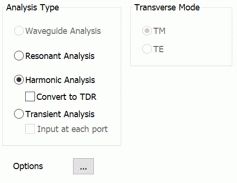
Analysis conditions for the electromagnetic analysis are set on this tab. The solver is Hertz.
It is in the [Analysis Condition Setting] dialog box. See also [How to Set Analysis Condition].
|
Setting Item |
Notes |
|||||||||||||
|
Analysis Types |
Waveguide analysis Solves the propagation frequency, the propagation constant and the characteristic impedance.
Resonant analysis Solves the electric resonance.
Harmonic analysis Solves the frequency response to the sinusoidal power, the voltage (AC), and the current (AC).
Transient analysis Solves the time response to the time-dependent input items (power, voltage, and current). Electromagnetic-transient analysis is available in an optional package.
|
|||||||||||||
|
Transverse Mode |
Available if both of the following conditions are met. - Analysis type is resonant analysis - Analysis space is 2D analysis or axisymmetric analysis
The modes listed below are computable.
|
Options
|
Options |
Notes |
|
Option Setup |
Click this button |
 . The
. The
The Relating Tabs
The relating tabs are [Open Boundary] tab, [Harmonic Analysis] tab, [Resonant Analysis] tab, [Waveguide Analysis] tab, [Transient Analysis] tab, and [High-Level Setting] tab.
How to Modify Analysis Conditions
To modify the analysis conditions, go to [Model] tab

and click [Analysis Condition]  . The dialog box will appear.