


|
Home / How to Set Analysis Condition / List of Analysis Condition Tabs / Piezoelectric Analysis Tab
Piezoelectric Analysis Tab
Analysis conditions for the piezoelectric analysis are set on this tab. The solver is Rayleigh.
It is in the [Analysis Condition Setting] dialog box. See also [How to Set Analysis Condition].
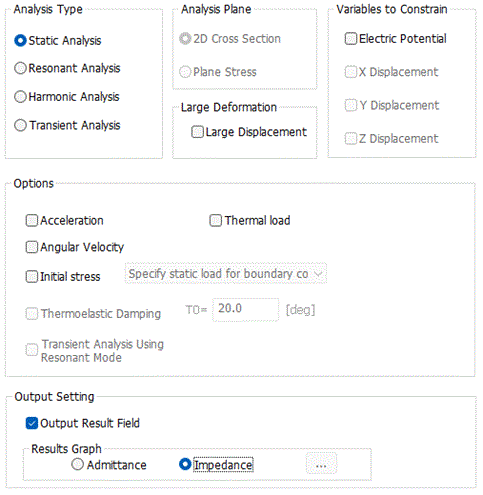
|
Setting Item |
Notes |
|
Analysis Type |
Static Analysis Constant load, voltage or current is applied.
Harmonic Analysis Solves the response to sinusoidal load, voltage and current.
Resonant Analysis Solves the mechanical resonance and the electric resonance. Please also see here.
Transient Analysis Solves transient states. An option for [Transient Analysis Using Resonant Mode] allows different analysis methods and things to analyze. See piezoelectric-transient analysis of technical note for more information.
|
|
Analysis Plane |
To perform the 2D analysis, select either one below.
2D cross section Applicable to the vibrators relatively thick against the plate dimensions. It corresponds to the plane strain of the stress analysis.
Plane Stress |
|
Variables to Constrain |
The piezo-vibration has four freedoms: the X/Y/Z/ displacement and the electric potential. Constrain the freedom which is known to be 0 from the beginning. The calculation time is reduced as the unnecessary calculation is skipped.
In the case of 2D analysis, select the Y-displacement because there is no displacement in Y direction. In the case of SH waves, however, leave the Y direction free as some modes have the vibration in the depth direction.
The displacement cannot be constrained in the 3D analysis.
Constrain the electric potential in the case of the non-piezo, pure elastic body, as there is no electric potential involved.
|
|
Large Deformation |
Analyzes the geometric nonlinearity involving large deformation.
Large deformation means rotation and large strain of elements. For the details, see Technical Note Analysis of Large Deformation (Geometric Nonlinearity).
If "Large displacement" is selected Rotation is taken into account. The total Lagrangian formulation with Green-Lagrangian strains is used.
The analysis of large deformation involves iterative calculations which may take long time. This option is applicable if the [analysis type] is either [static analysis] or [transient analysis]. |
Options
|
Options |
Notes |
|
Acceleration |
Takes the weight of the model into account. Not selectable in the resonant analysis. |
|
Angular Velocity |
Available only in the 3D analysis. If [Analysis Type] is static analysis, the analysis with centrifugal force taken into account is possible. If [Analysis Type] is harmonic analysis, the analysis with Coriolis force taken into account is possible. |
|
Thermal Load / Constant Temperature |
Takes the thermal load into account. If selected, the setting on the step/ thermal load tab is allowed.
Select "Constant temperature" to set the constant temperature on the Constant Temperature tab. If this option is selected, the temperature dependency on Viscoelasticity tab can be used for the analysis. "Constant temperature" is set on the Constant Temperature tab.
|
|
Initial stress |
By taking into account the initial stress, the hardening effect of tensile force (higher resonant frequency) is calculated. See Analysis with initial stress taken into account for the details.
This analysis is performed in two stages. 1st step: Solve the displacement and stress with the static analysis (Analysis 1). 2nd step: Using the data of displacement and stress that are obtained in the Analysis 1, perform the analysis with initial stress taken into account (Analysis 2).
The results of Analyses 1 and 2 are displayed in the result field. Displacement of Analysis 1 is added to that of Analysis 2 in the displacement diagram of Analysis 2. Scale for the displacement of Analysis 1 is not adjusted.
Take into account If this option is selected, the analysis is performed with initial stress taken into account.
Specify static load for boundary condition (Piezoelectric analysis Example 13) Analyses 1 and 2 are performed in order. This function is available for resonant analysis only. If this is selected, the deformation is obtained with static load of force boundary condition and displacement boundary condition (non-zero). Based on this displacement, the resonant analysis is performed with hardening (or softening) effect taken into account. Please note that in the analysis 2, the place where the static load is applied is treated as fixation boundary condition (displacement is 0).
Use analysis results (Results import) (Piezoelectric analysis Example 13) This method can be selected after the analysis 1 is completed. This can be used in the static analysis, the harmonic analysis and the resonant analysis. Instead of omitting Analysis 1, the results of the stress and piezoelectricity are specified on the Results Import tab. Nonlinear static analysis (large deformation, contact) is not applicable.
|
|
Take thermoelastic damping into account
|
It is available for the harmonic analysis and resonant analysis. Thermoelastic damping is a function to take into account the loss due to the temperature change incurred by vibration. Enter the temperature of vibrating element in T0. See Example 22 for reference. |
|
Transient Analysis Using Resonant Mode |
Specifies the method for the transient analysis. If deselected The implicit method of the finite element method is applied. The same method is applied in the stress-transient analysis. (an optional license required) If selected The field is the sum of the eigenmodes acquired by resonant analysis and the results of static analysis. The time-dependent loads given are the voltage and the force specified for the boundary conditions. See piezoelectric-transient analysis of technical note for more information.
|
 "Thermal load" is for the static analysis. "Constant temperature" is for the harmonic analysis.
Output Setting
|
Setting Item |
Notes |
|
Output Result Field
|
Outputs the result fields if selected. Always enabled in the case of transient analysis. Outputs the result fields in the nonlinear static analysis, such as large displacement or contact analysis, regardless whether selected or deselected. |
|
Results Graph |
- The format is either [Impedance] or [Admittance]. If [Show S/Y-parameters] is selected in the dialog box of [Calculation Finished], specify the vertical axis of a graph which is displayed after pressing the [Show] button. Specify the output type of Touchstone file. In the static analysis, however, the impedance and the admittance are not calculated. In the resonant analysis, the impedance or the admittance will be output.
- This button is active if the analysis type resonant analysis. By pressing this button, a RayImpGraph dialog box will show up to calculate the impedance and the admittance (except for some cases). Maximum frequency, minimum frequency, and number of divisions are entered. The entered values are used to calculate the impedance in the resonant analysis.
|

The Relating Tabs
The relating tabs are [Harmonic Analysis] tab, [Resonant Analysis] tab, [Acceleration] tab, [Thermal Load] tab , [Constant Temperature] tab, [Results Import] tab, and [High-Level Setting] tab.
How to Modify Analysis Conditions
To modify the analysis conditions, go to [Model] tab for

and click [Analysis Condition]  . The dialog box will appear.