Home / Tutorial / Magnetic Analysis (Gauss, Static Analysis) / 05.Set the Analysis Conditions
05.Set the Analysis Conditions
We set the analysis conditions.
Procedure
-
On the [Model] tab, go to
 , ,
and click [Analysis Condition]  . .
The [Analysis Condition Setting] dialog will show up.
|
|
-
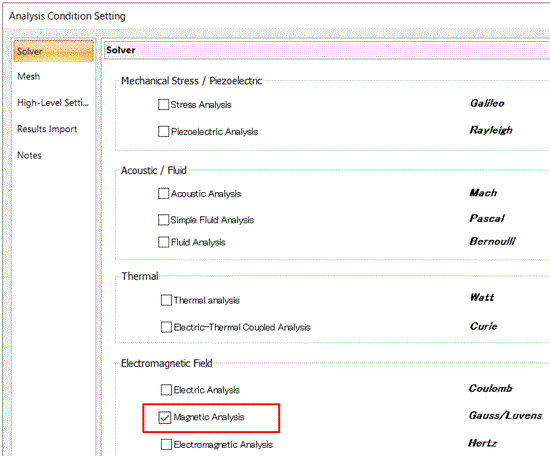
Select [Magnetic analysis "Gauss"] on the [Solver] tab.
|
|
-
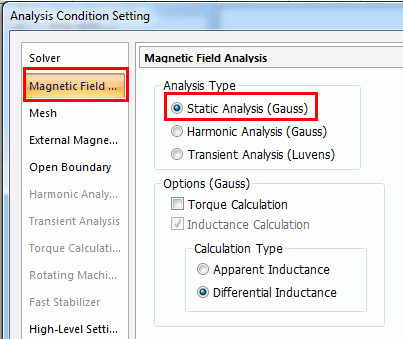
Go to the [Magnetic Analysis] tab.
Confirm that the [Analysis Type] is [Static analysis].
|
|
-
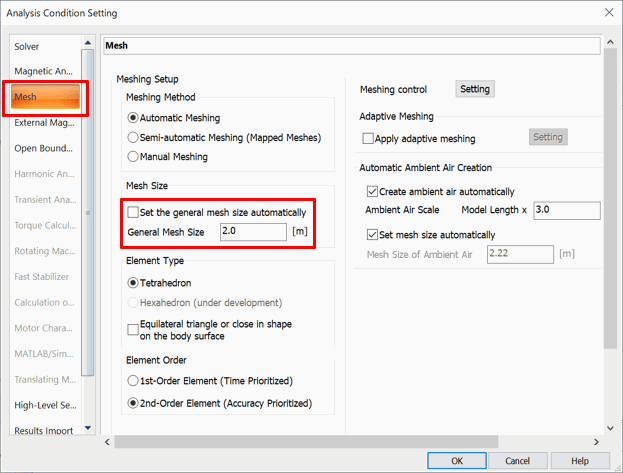
Click [Mesh] tab and set as follows;
Deselect [Set the general mesh size automatically]Enter 2 in [General mesh size]
Click  . .
-
The simulation accuracy varies depending on the mesh size and other settings.
Details are described at [How to Optimize the Simulation Accuracy].
|
|
|
The analysis conditions have been set. |
|


