


|
Home / User Interface / Trees / Project Tree
Project Tree
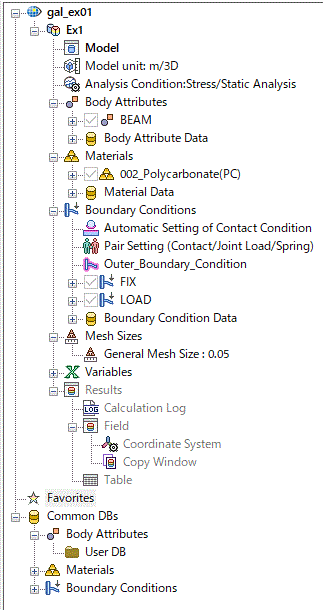
The various information for the project currently open is displayed on project tree.
The analysis models, conditions, attributes, results and favorites are on the tree.
Body attributes, material properties and boundary conditions, which are registered on User DB, and material DB can be viewed in Common DBs.
-
See [Project Structure].
|
|
Tree LegendBold characters (active)Currently active analysis model and project are indicated in bold characters. The commands on the ribbon menu are executable. Double click the item on the tree to switch. * markIndicates that the item is being edited currently. <incomplete>Indicates that the information required for the simulation is not fully entered. <undefined>Indicates that the attribute data doesn't exist. DatabasesBody attribute data /Material property data/Boundary condition dataEach analysis model has its own data of these. They can are used only by their owner model. They can be shared through User DB. Right click the mouse and click [Transfer to User DB]. Material DatabaseCommon DB contains the data for various standard materials.
User DBSome data which are used often can be stored in Use DB Once stored in User DB, they can be shared with other projects and analysis models. Specify their folders at [General Settings] - [Database]. To use the data in the database, select [Use in Active Analysis Model] on the right-click menu.
|
Possible Operations in Project Tree
|
Categories |
Possible operations |
|
Operations on projects |
|
|
Operations on analysis models |
|
|
Operations on models |
|
|
Operations on analysis conditions |
|
|
Operations on attributes (body attributes, material properties and boundary conditions) |
|
|
Operations on bodies |
|
|
Operations on mesh sizes |
|
|
Operations on variables |
See [Variables]. |
|
Operations on results |
|
|
Operations on various attributes data and Common DB |
|