


|
Home / How to Set Analysis Condition / List of Analysis Condition Tabs / Magnetic Analysis Tab
Magnetic Analysis Tab
Analysis conditions for the magnetic analysis are set on this tab. The solver is Gauss.
It is in the [Analysis Condition Setting] dialog box. See also [How to Set Analysis Condition].
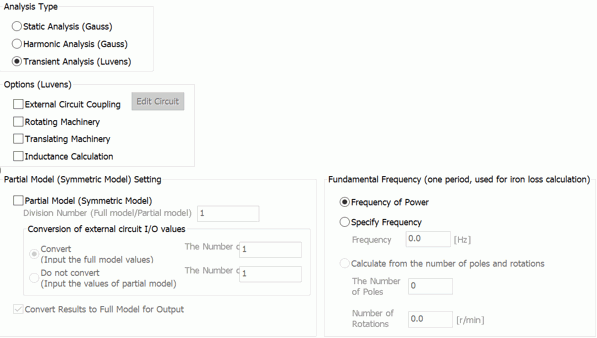
|
Setting Item |
Notes |
|
Analysis Type |
Static analysis The constant load, voltage or current is applied.
Harmonic analysis The sinusoidal load, voltage or current is applied.
Transient Analysis Transient states are analyzed. (Note) The magnetic-transient analysis is available in an optional package.
|
Analysis Options (Static or Harmonic analysis)
|
Analysis Options |
Notes |
|
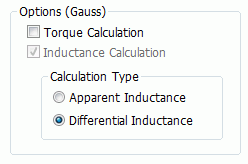
Calculate Torque |
Calculates the torque of the electromagnetic force. Available for the 2D or 3D static analysis. |
|
Calculate Inductance |
Calculates the self-inductance, mutual inductance, and impedance(in the harmonic analysis only).
|
|
Calculation Type |
Selects a calculation type of inductance from the following.
Apparent Inductance Differential Inductance
Selection is required if the analysis type is static as well as nonlinear. For other analysis types, the setting is irrelevant. The results will be the same whichever is opted.
See [Calculation Type of Inductance] for details.
|
Options (Transient analysis)
|
Options |
Notes |
||||||||||
|
External Circuit Coupling |
Executes a coupled analysis with the external circuit.
Click
|
||||||||||
|
Rotating Machinery |
Analyzes rotating machinery such as motor and generator. Refer to [Rotating machinery tab] for detailed setting. |
||||||||||
|
Translational Machinery |
Analyzes translational machinery such as linear motor and shaft motor. Refer to [Translational Machinery tab] for detailed setting. |
||||||||||
|
Calculate the Inductance |
Calculates the self-inductance and mutual inductance.
|
||||||||||
|
Partial Model (Symmetric Model) Setting |
Sets the partial model (symmetric model). Setting items are as follows.
Partial Model (Symmetric Model) Selected if the analysis domain is partial model (symmetric model) such as period symmetric. Division Numbers (Full model/Partial model) Sets the number of divisions of the full model. If the the model is quarter symmetric, enter 4. Conversion of I/O values of External Circuit If [Convert] and [Convert results to full model for output] are selected, the values related to the external circuit will be converted to the full model for output. Converted values are such as current of components of the circuit, which are displayed on the results table. If [Convert] is selected, enter the number in[Number of series] and [Number of parallels] for coils on the external circuit. See [Example of External Circuit Conversion Setup] for the details. See also [External Circuit Conversion]. Convert Results to Full Model for Output Converts the results (values such as torque which are shown in the result table) to the full model for output. In the case of 2D quarter symmetric model for example, the torque value is obtained by [torque value of the quarter model x model thickness x number of divisions of the full model].
|
||||||||||
|
Fundamental Frequency (for determining one period and iron loss calculation) |
Used to determine one period of the electric angle and calculate the iron loss. Available only for the transient analysis.
Frequency of Power Automatically referred to. Not available for the DC power. It is determined by the setting on the [Current] tab in the body attribute.
The fundamental frequency is specified manually.
Calculate from the number of poles and rotations The number of poles and rotations of the rotating machinery are used for calculation. Enter the number of poles. The number of rotations on the [Rotating Machinery] tab is referred to.
|
 and launch
The Relating Tabs
The relating tabs are [External Magnetic Field] tab, [Open Boundary] tab, [Harmonic Analysis] tab, [Torque Calculation] tab, [Rotating Machinery] tab, and [High-Level Setting] tab.
How to Modify Analysis Conditions
To modify the analysis conditions, go to [Model] tab

and click [Analysis Condition]  . The dialog box will appear.