

CAE Software【Femtet】Murata Software Co., Ltd.

Example3 Block Containing Heating Element(Steady-State Analysis)
General
-
A heating element is placed in a block. The ambient temperature is constant.
-
The temperature distribution and the heat flux vectors are solved.
-
Unless specified in the list below, the default conditions will be applied.
Analysis Space
|
Item |
Settings |
|
Analysis Space |
3D |
|
Model unit |
mm |
Analysis Conditions
|
Item |
Settings |
|
Solver |
Thermal Analysis [Watt] |
|
Analysis Type |
Steady-state analysis |
|
Options |
N/A |
Model
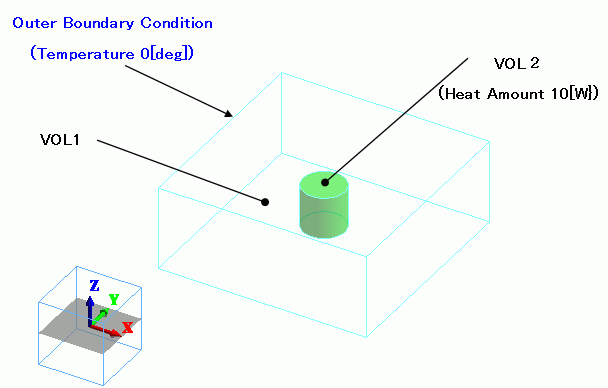
A cylindrical heating element (Nichrome) is placed in the center of a glass-epoxy block.
The heat source is set in the body attribute. The ambient temperature is set to 0[deg] in the external boundary condition.
Body Attributes and Materials
|
Body Number/Type |
Body Attribute Name |
Material Name |
Mesh Size |
|
0/Solid |
VOL1 |
006_Glass_epoxy * |
|
|
1/Solid |
VOL2 |
109_Nichrome * |
2 |
* Available from the Material DB
The heat source of VOL2 is set up as follows.
|
Body Attribute Name |
Tab |
Settings |
|
VOL2 |
Heat Source |
10[W} |
Boundary Conditions
|
Boundary Condition Name/Topology |
Tab |
Boundary Condition Type |
Settings |
|
Outer Boundary Condition |
Heat |
Temperature |
0[deg] |
To set Outer Boundary Condition, go to the [Model] tab
and click [Outer Boundary Condition]  .
.
Results
A section’s temperature distribution is shown below.
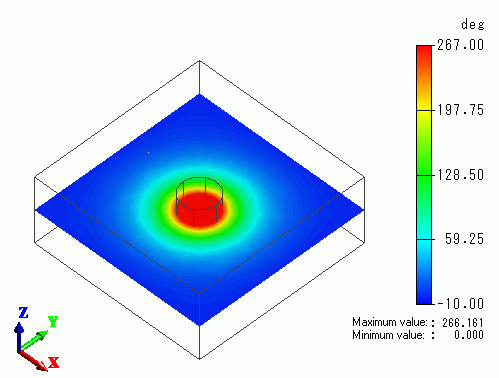
The hottest point is the center of the heating element. The temperature is 266[deg].
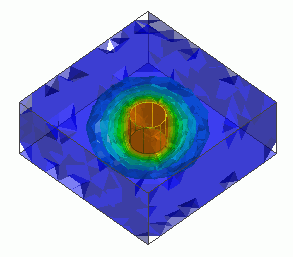
Shown below is the isosurface contour of the temperature distribution. “Shading” and “Translucency” are enabled.
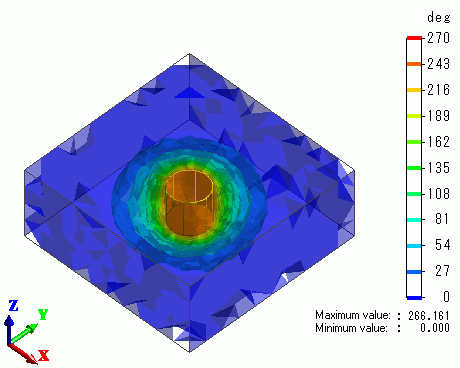
The 3D temperature gradient is exhibited clearly around the heating element.