


|
Home / Tutorial / Fluid Analysis_2 (Bernoulli, Diffusion Analysis: Automatic Internal Fluid Creation) / 00.Overview
00.Overview
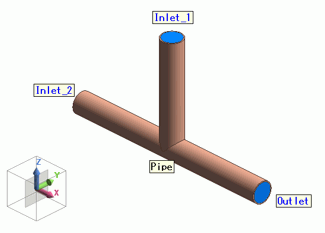
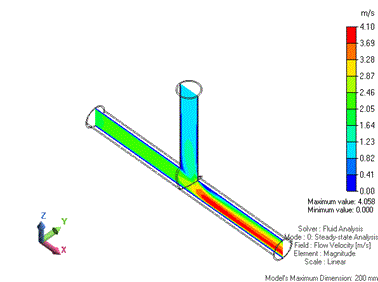
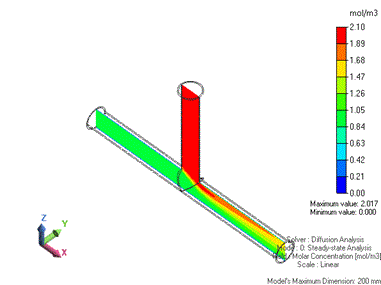
Fluids containing diffusing materials at different concentrations flow in from two inlets of the T-shaped pipe, mix with each other, and flow out through one outlet. The flow is solved in this tutorial.
[Automatic Fluid Domain Creation] is applied.
Analysis Space
|
Setting Item |
Setting |
|
Analysis Space |
3D |
|
Model Unit |
mm |
Analysis Conditions
|
Setting Item |
Setting |
|
Analysis Type |
Steady-state Analysis |
Model
Two pipes are defined from cylindrical solid bodies and united into one tube using Unite (Boolean) operation, which is then hollowed out by the shell process.
Select the edges of the three openings and convert each edge into a sheet body to create a lid at the corresponding opening.
The inlet boundary condition is set to two lids of three for air to flow in; the outlet boundary condition is set to the other lid for air to flow out.
The fluid domain is automatically created.
Results
 |
 |
|
Gradation Contour of Flow Velocity (Cross Section) |
Gradation Contour of Molar Concentration (Cross Section) |
 Prev Next
Analysis Flow
|
Title |
|
00. Overview |
|
01.Create a New Project |
|
02. Create the Two Pipe Models |
|
03. Unite Two Pipes to Form T-Shaped Pipe |
|
04. Hollow out Inside of T-Shaped Pipe. |
|
05. Create a Sheet Body for Lid at the Opening. |
|
06.Set the Analysis Conditions |
|
07.Set the Body Attributes and the Material Properties |
|
08. Set the Boundary Conditions. |
|
09.Run the Mesher and the Solver |
|
10.Show the Results |
|
11.Save the Project |