Home / Tutorial / Fluid Analysis_2 (Bernoulli, Diffusion Analysis: Automatic Internal Fluid Creation) / 06.Set the Analysis Conditions
06.Set the Analysis Conditions
We set the analysis conditions.
Procedure
-
On the [Model] tab, go to
 , ,
and click [Analysis Condition]  . .
The [Analysis Condition Setting] dialog will show up.
|
|
-
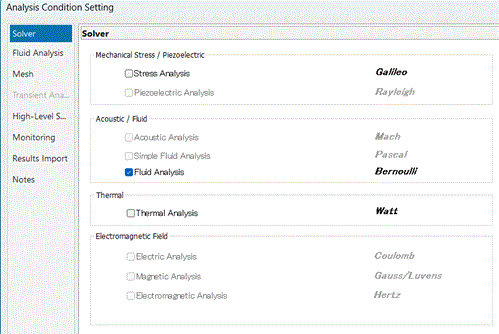
Select [Fluid analysis "Bernuolli"] on the [Solver] tab.
|
|
-
Click the [Fluid Analysis] tab.
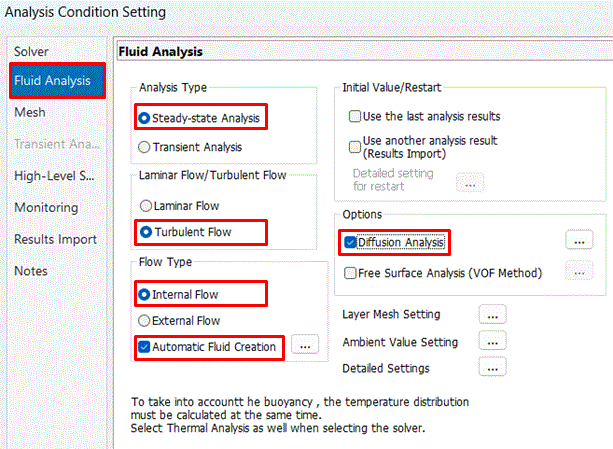
Confirm that [Analysis Type] is set to [Steady-state analysis], [Laminar Flow/Turbulent Flow] is set to [Turbulent Flow], [Flow Type] is set to [Internal Flow], and [Automatic Flow Domain Creation] is selected.
Select [Diffusion Analysis] in the [Option] and click  . .
-
In this session, no further detailed settings are made for [Automatic Fluid Domain Creation]. Although a fluid material can be specified, the default material [000_Air] is applied.
-
In this session, no further detailed settings are made for [Diffusion Analysis]. Although the type and unit of diffusion quantity can be changed, the default type and unit [Molar concentration [mol/m3]] is applied.
|
|
|
The analysis conditions have been set. |
|


 Prev Next