


|
Home / How to Set Analysis Condition / List of Analysis Condition Tabs / Stress Analysis Tab
Stress Analysis Tab
Analysis conditions for the stress analysis are set on this tab. The solver is Galileo.
It is in the [Analysis Condition Setting] dialog box. See also [How to Set Analysis Condition] to show the dialog box.
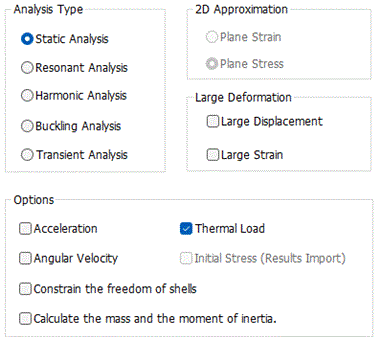
|
Setting Item |
Notes |
|
Analysis Type |
Static analysis A certain constant load is applied.
Harmonic analysis The sinusoidal load is applied.
Resonant analysis The model's mechanical resonance is solved.
Buckling analysis The object's buckling load factor and the buckling modes are solved.
Transient analysis Transient states are analyzed. Thel stress transient analysis is available in an optional package.
|
|
2D Approximation |
To perform the 2D analysis, select either one below.
Planar strain If the object is fixed in the Y direction, there will be no displacement in the Y direction. Then we can take into account the X/Z components of the strain only. This is called the planar strain approximation.
Plane stress If the object's Y dimension is considerably smaller than the X/Z dimensions and the object can deform freely in the Y direction, we can assume that the stress has X/Z components only. This is called the plane stress approximation.
|
Options
|
Options |
Notes |
|
Large Deformation |
Analyzes the geometric nonlinearity involving large deformation.
Large deformation means rotation and large strain of elements. See Technical Note Analysis of Large Deformation (Geometric Nonlinearity for details.
- Select "Large displacement" to have rotation involved. The total Lagrangian formulation with Green-Lagrangian strains is used.
- Select both "Large displacement" and "Large strain" to have rotation and large strain involved. The updated Lagrangian formulation with logarithmic strain is used. It is recommended to select "Large displacement" when you are selecting "Large strain".
- Select "Large strain" to have large strain involved. The updated Lagrangian formulation with logarithmic strain is used.
Executes iterative calculations that may take long time. Available if static analysis or transient analysis is selected as an analysis type. |
|
Acceleration |
Takes the weight of the model into account. Not available for the resonant analysis. |
|
Thermal Load / Constant Temperature |
Takes the thermal load into account. If selected, the thermal load is set on the thermal load tab.
Select "Constant temperature" to set the constant temperature on the Constant Temperature tab. If this option is selected, the temperature dependency can be set on Elasticity tab and Viscoelasticity tab. "Constant temperature" is set on the Constant Temperature tab.
|
|
Angular velocity |
Takes the centrifugal force into account. Available for the axisymmetric or 3D static analysis. The rotation axis is fixed to Z. |
|
Initial Stress |
Takes the initial stress into account.
It can calculate the hardening effect of tensile force (higher resonant frequency). See Analysis with initial stress taken into account for the details.
This analysis is performed in two stages. 1st step: Solve the displacement and stress with the static analysis (Analysis 1). 2nd step: Using the data of displacement and stress that are obtained in the Analysis 1, perform the analysis with initial stress taken into account (Analysis 2).
The results of Analyses 1 and 2 can be viewed in the results field. Displacement of Analysis 1 is added to that of Analysis 2 in the displacement diagram of Analysis 2. Scale for the displacement of Analysis 1 is not adjusted.
After Analysis 1 is performed, the results of the stress and piezoelectricity are specified on the Results Import tab.
|
|
Constrain the Freedom of Shells |
Available for the 3D analysis. If selected, the freedom of displacement in the rotational direction can be constrained on the mechanical tab. |
|
Calculate the Mass and the Moment of Inertia |
Calculates the mass and the moment of inertia and output the results in the numerical summary table. The mass density is set on the Material Property tab. The angular velocity is set on the Angular Velocity tab. The mass is calculated from the mass density. The inertia is calculated from the angular velocity.
|
 "Thermal load" is for static or buckling analysis. "Constant temperature" is for resonant, harmonic or transient analysis.
The Relating Tabs
The relating tabs are [Resonant Analysis] tab, [Harmonic Analysis] tab, [Transient Analysis] tab, [Step/Thermal Load] tab, [Acceleration] tab, [Angular Velocity] tab[Constant Temperature] tab, [Results Import] tab, and [High-Level Setting] tab.
How to Modify Analysis Conditions
To modify the analysis conditions, go to [Model] tab for

and click [Analysis Condition]  . The dialog box will appear.