Home / Tutorial / Magnetic Analysis (Luvens, Transient Analysis of Motor) / 09.Set the Body Attributes and the Material Properties 1
09.Set the Body Attributes and the Material Properties 1
We assign names to the body attributes and the material properties. Various parameters associated with them will be set up here, too.
Body attribute is set for each body. Conditions of coil (current direction, current value, and association with external circuit) and magnetization direction of magnet are set.
Body attribute is distinguished by its name. Therefore it is not allowed to assign the same name to the different body attributes.
Material property constitutes the body. The material data might vary depending on the simulation you try.
Material property is distinguished by its name. Therefore it is not allowed to assign the same name to the different material data.
Settings for coil is explained below.
Procedure
-
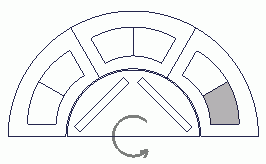
Conditions of coil are set.
Click the coil in the far right.
-
-
Space Key Method
Rest the mouse pointer on the overlapping area, and press the <Space> key.
Body selection will change. The left-click will fix the selection.
-
List Selection Method
Rest the mouse pointer on the overlapping area, and press the <Tab> key.
The body selection list will appear. Select the body of your interest and left-click to fix the selection.
For more information, see How to Select Bodies and Topologies where you will find "Clicking the Mouse" and "List Selection Method".
|
 |
-
On the [Attribute] context tab  , ,
click [Body Attribute/Material Property]  . .
|
|
-
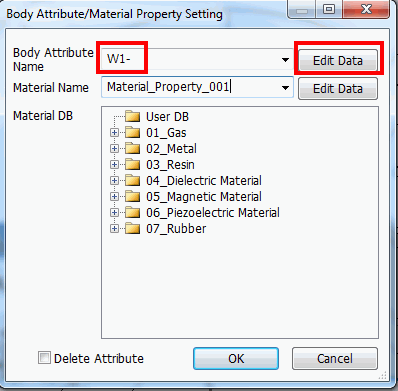
In the [Body Attribute/Material Property Setting] dialog box,
enter Body Attribute Name: W1- and click  . .
|
|
-
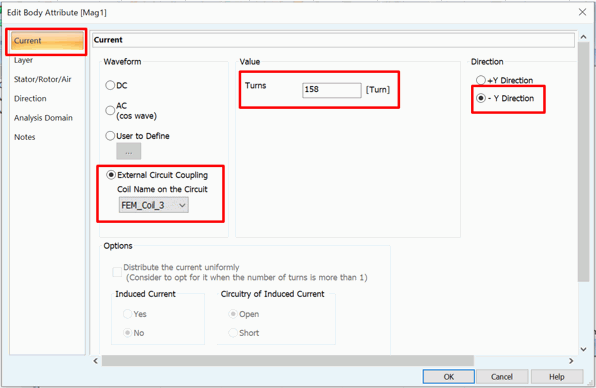
In the [Edit Body Attribute [W1-] dialog box, go to the [Current] tab. Enter the following and then click  . .
Waveform: External Circuit Coupling
Coil Name on Circuit: FEM_Coil_3
Number of turns: 158
Direction: -Y Direction
|
|
-
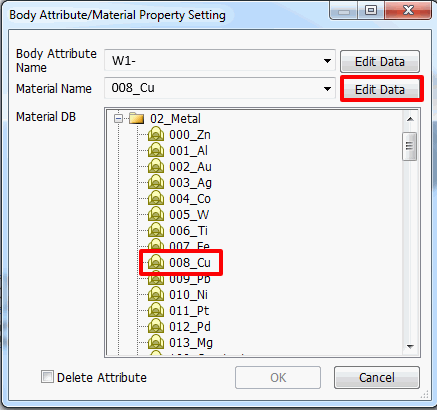
In the [Body Attribute/Material Property Setting] dialog box,
go to Material DB and click [008_Cu].
|
|
- Click in the [Body Attribute/Material Property Setting] dialog box.
-
Material data frequently used can be registered.
See [User DB] on the Project Tree for the detail.
-
Material DB (Database) is readily available in Femtet for standard materials such as iron, copper etc.
See [Material DB] on the Project Tree for the detail.
|
|
- Likewise, set the remaining 5 coils as follows.
Body Attribute Name: From right to left, [W1-] (already set), [U1+], [U1-], [V1+], [V1-], [W1+]
Material Name: [008_Cu] for all
Set on the [Current] tab as follows for each body attribute.
| Body Attribute Name: |
Waveform |
Coil Name on the Circuit |
Turns |
Direction |
| W1- (already set) |
External Circuit Coupling |
FEM_Coil_3 |
158 |
- Y Direction |
| U1+ |
External Circuit Coupling |
FEM_Coil_1 |
158 |
+Y Direction |
| U1- |
External Circuit Coupling |
FEM_Coil_1 |
158 |
- Y Direction |
| V1+ |
External Circuit Coupling |
FEM_Coil_2 |
158 |
+Y Direction |
| V1- |
External Circuit Coupling |
FEM_Coil_2 |
158 |
- Y Direction |
| W1+ |
External Circuit Coupling |
FEM_Coil_3 |
158 |
+Y Direction |
|
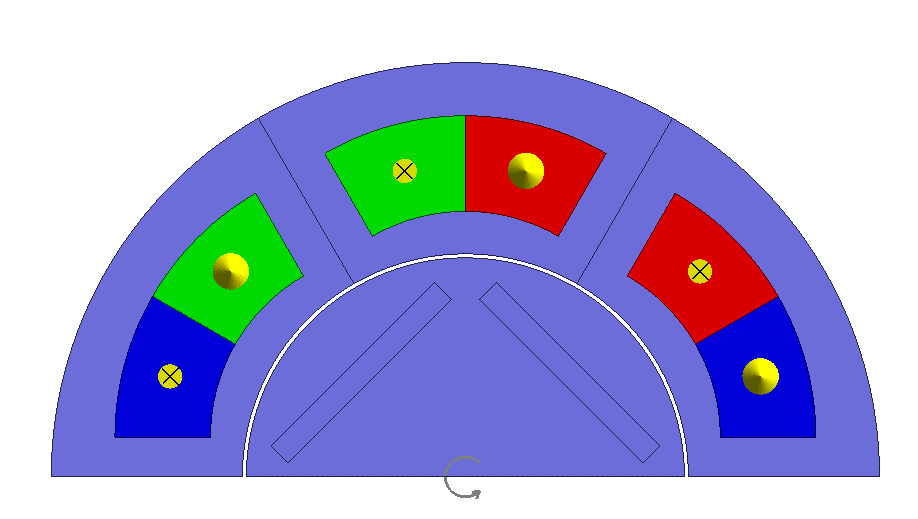
|
|
The setting has been completed.
|
|


 .
. Prev Next