Home / Tutorial / Magnetic Analysis (Luvens, Transient Analysis of Motor) / 11. Set the Periodic Boundary Conditions
11. Set the Periodic Boundary Conditions
As the model in this session is a half period symmetric, boundary conditions are set on the symmetric face.
You need to set boundary conditions on some parts of model's body (topology).
It varies depending on the analysis.
The boundary conditions are distinguished by name. It is not allowed to assign the same name to the different boundary conditions
Procedure
-
On the [Model] tab, go to

and click [Select Edge] on the drop-down list at  . .
-
How to Switch the Object to Select
-
Concept of Body and Topology
|
|
-
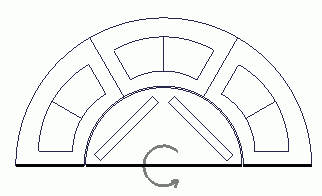
Click three edges of the symmetric face while pressing the <Ctrl> key.
-
In the magnetic transient analysis, simulation can be performed by setting symmetric boundary condition on any one of the edges. But for the purpose of easy viewing on the modeling window, the conditions are set on 3 edges in this session.
|
|
-
On the [Attribute] context tab  , ,
click [Boundary Condition]  . .
|
|
-
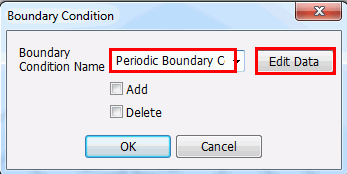
In the [Boundary Condition] dialog box, enter
Boundary Condition Name: Periodic boundary
and click  . .
|
|
-
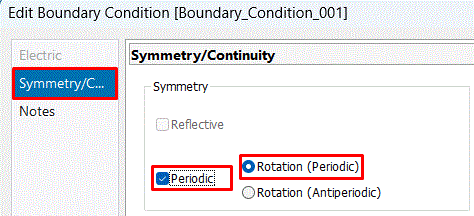
In the [Edit Boundary Condition] dialog box,
go to the [Symmetry/Continuity] tab. Select the items below and click  . .
[Periodic]
[Rotation Period (1 period)]
Then, click in the [Edit Boundary Condition] dialog box and exit.
|
|
|
The boundary conditions have been set. |
|


 Prev Next