


|
Home / Tutorial / Modeling / 00.Overview
00.Overview
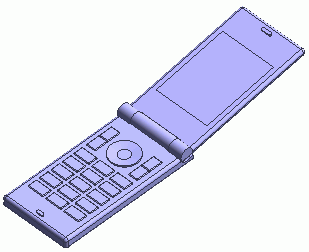
For the modeling exercise, we create a mobile phone.
You can learn how to create primitives and how to modify bodies".
The commands to learn:
|
Creating primitives |
|
|
|
Modifying bodies |
|
 Prev Next
Modeling Flow
|
Title |
Operation |
|
00.Overview |
|
|
01.Create a New Project |
|
|
02.Create a Bottom Case |
|
|
03.Create a Hinge's Inner Cylinder |
|
|
04.Create a Hinge's Outer Cylinder |
|
|
05.Create a Top Case |
|
|
06.Create a Box in the Hinge |
|
|
07.Cut the Hinge's Cylinders |
|
|
08.Remove the Outer Cylinder in the Middle |
|
|
09.Modify the Top Case |
|
|
10.Modify the Top Case |
|
|
11.Modify the Bottom Case |
|
|
12.Modify the Bottom Case |
|
|
13.Rotate the Top Case |
|
|
14.Modify the Bottom Case |
|
|
15.Create Keys |
|
|
16.Create Keys |
|
|
17.Create a Center Button |
|
|
18.Complete the Center Button |
|
|
19.Create an Opening for the Microphone |
|
|
20.Create an Opening for the Speaker |
|
|
21.Create a Display |
|
|
22.Fillet the Case Edges |
|
|
23.Fillet the Key Edges |
|